
“Agentic AI” is one of today’s most popular AI terms. But what does it actually mean?
At its core, Agentic AI describes systems that can make decisions and perform tasks on their own. They don’t just respond—they take action. That autonomy comes from two capabilities:
For humans, we can easily act on our decisions. For large language models (LLMs), it doesn't have that same capability. An LLM can reason about what should happen, but it can’t take action unless we give it a way to interact with the world.
That bridge is tool calling—the mechanism that turns a passive LLM into an active, task-performing agent.

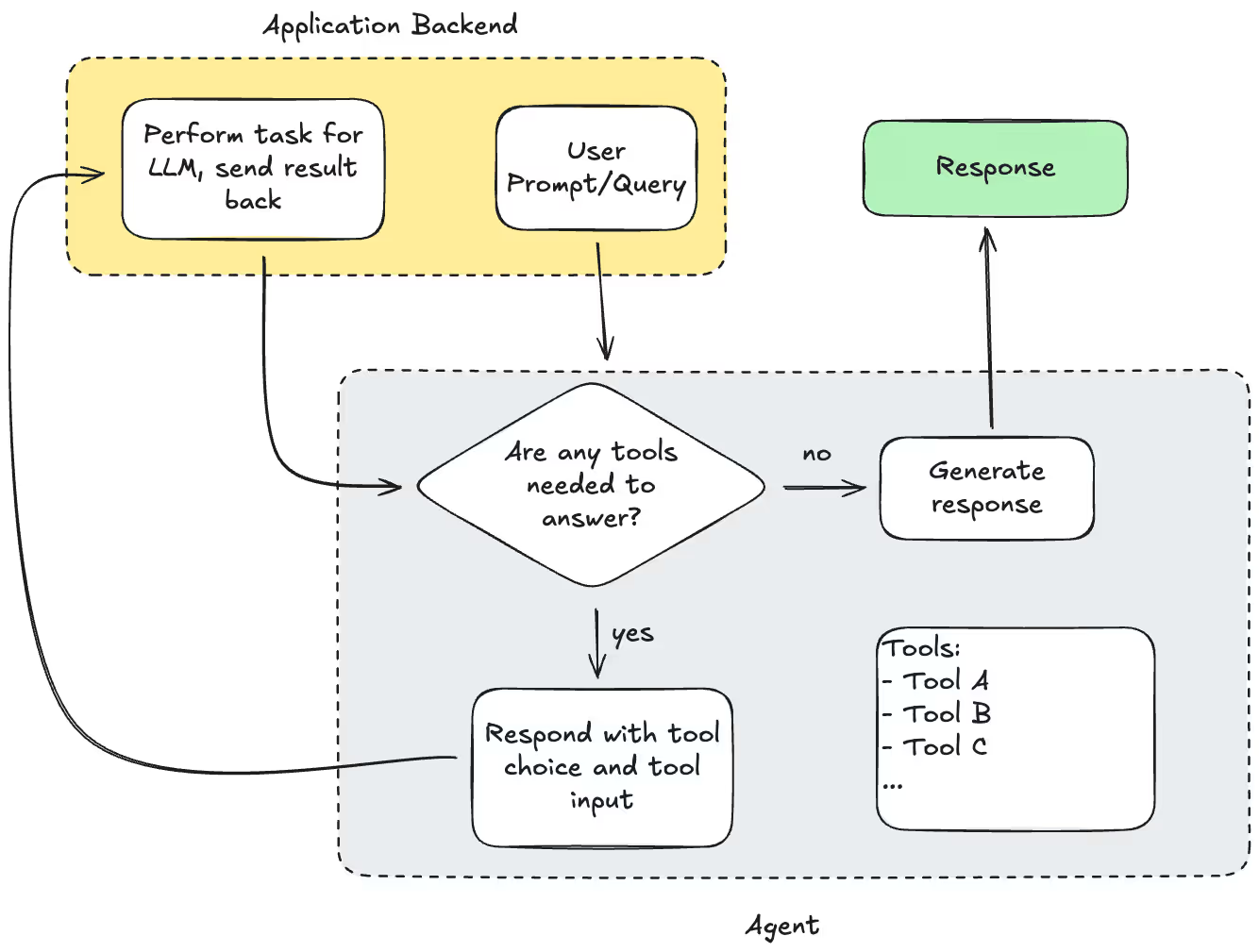
If Agentic AI is about helping LLMs act, tool calling is how they do it. Tool calling allows an LLM to use external functions or APIs (tools) to perform real-world tasks based on its reasoning. Instead of returning only text, the LLM can decide which tool to use, call it with specific inputs, and then continue reasoning using the results.
Consider the question: “What’s the weather today?”
An LLM doesn’t know the current weather. But if you give it a "getWeather" tool:
Agents build on this by using recursive tool calling to achieve their results:
Tool calling isn’t just about giving an LLM access to functions. You can also shape the LLM's behavior:
These techniques can improve both clarity and speed.
(Say that 3 times fast!)
One of our clients needed to extract many different values from documents. Each value had its own instructions, often like this:
Value A can be found in Section X. If Value A is found, set Value B to ‘yes.’
This instruction means B depends on A.
Mapping a few dependencies by hand is simple. Mapping hundreds—written in natural language and full of cross-references—is not.
Instead of doing it manually, we used tool calling to:
The result: a fully automated process for untangling human-written rules, and outputting a dependency tree that helped parallelize extractions.
These two ideas work together, but they solve different problems:
In practice, you often use tool calls to collect what you need for the agent—and structured output to produce the final answer in a format fit for use outside of the agent.
Tool calling can be thought of as an expanded form of RAG. Instead of retrieving only documents, you’re giving the LLM access to any external capability. There are two ways to design this:
You decide exactly which tools to call before sending your prompt to the LLM. You execute these tools as needed, and enrich the prompt with context from the pre-determined calls.
Pros:
Cons:
An example of this approach is basic RAG: you use a specific query to gather relevant documents, enrich your context with this data, and send it to the LLM.
You give the LLM a list of tools, and their specifications, and let it choose.
Pros:
Cons:
Agents shine in complex, open-ended workflows—but they must be managed carefully. An example of this approach is to give the LLM a 'RAG tool', and let the LLM decide when to use the tool, and with what inputs.
LLMs don’t naturally reveal their thought process unless you use a dedicated reasoning model. But tool calling gives us a workaround. You can:
Good agents aren’t just powerful—they’re monitored and constrained.
Left unchecked, an agent can call tools endlessly to verify its own logic. To prevent runaway behavior:
The goal is to keep the agent smart, efficient, and affordable.
Tool calling unlocks the “agentic” in Agentic AI. It lets LLMs make decisions, take action, and operate beyond their training data. But with that power comes the need for clear controls, thoughtful design, and cost-aware engineering.
Used well, tool calling turns LLMs from passive responders into active problem-solvers—capable of navigating complex tasks, coordinating multiple steps, and producing reliable, actionable outcomes.
If you’re building anything more ambitious than a single-prompt chatbot, tool calling is the key to taking your system beyond RAG and into true Agentic AI.